
Something very rare happened to me a few months ago. My wife, who is not a huge fan of technology despite my best efforts, texted me a photo of a device, instructing me that I HAD to review it. That stopped me in my tracks. She NEVER tells me to get more tech. So, I became very curious about learning more about the gadget that she was suddenly so passionate about. It turns out, it was the Meural. What’s the Meural? Well, it’s sort of a digital picture frame. Yawn, you might say – another digital frame, nothing new here. But when I dove into the details behind this frame and the service it provides, I suddenly knew why my wife was so excited about it. (*Disclosure below.)
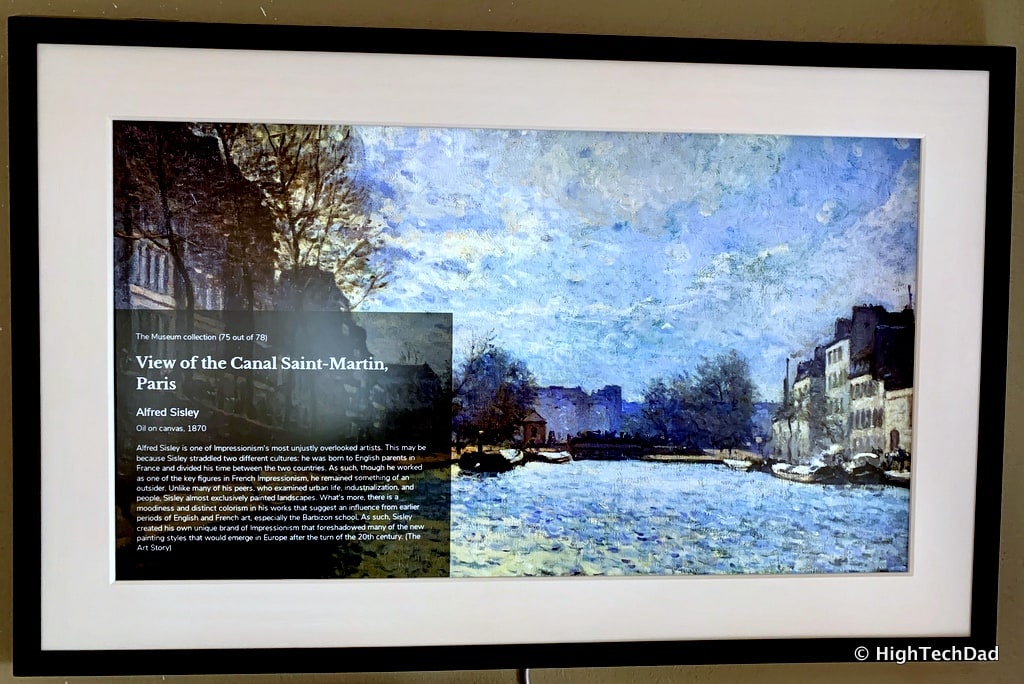
So, yes, Meural is indeed a digital frame. But it is a whole lot more. When coupled with the Annual Membership (which I will go into shortly), it suddenly becomes a famous museum or gallery on your wall. And it is interactive and educational in the process.
A month or so after my wife texted me about the Meural, there happened to be a Founders Series meetup at my favorite tech store in San Francisco. B8ta, which you can read a bit more about in this article, hosts a regular series where founders of products that are showcased in the store provide insights into starting and running their companies. In September, as luck would have it, the co-founder and CEO of Meural, Vladimir Vukicevic, was the featured founder. This particular session provided an incredible amount of information about how Meural came to be.
Eventually, I was able to get my hands on a Meural Canvas, was one of the first people to test out their new Swivel Mount, and experience the joy of letting my wife pick and choose images from museums from around the world. And I even played with taking photos and applying artistic “painterly” filters and uploading them to the Canvas as well. The Meural is now showcased prominently on our living room wall!
What Is Meural and the Membership?
As I said, Meural is more than just a digital picture frame. Yes, you can upload your own photos or images and display them just like any other digital frame. Meural is much more classy, elegant, and sophisticated. From the design to the functionality to the images available to load onto it (more about that shortly), the Meural brings your wall alive with classic and modern artwork, photography, images (even moving images) from international galleries around the world, as well as exclusive artwork explicitly designed for the Meural Canvas.
The hardware itself connects to your WiFi, and the playlists are loaded from your smartphone after being chosen and curated by you. Yes, you can load your own images to the Canvas as well, but I feel that the true power of this “art solution” is what Meural has already done for you. It has negotiated with major national and international galleries around the world to get rights to showcase the works of masters from many ages.
A few weeks before we physically got the Meural, my oldest daughter was in Washington DC. On her own, she went to visit the National Gallery of Art. My wife and I started receiving texted images of various famous works she was seeing as she toured the National Gallery. My wife started texting back how jealous she was that my daughter was seeing these amazing works of art.
As I knew that I was going to be receiving the Meural soon, I decided to check to see if the National Gallery was listed among the many museums that Meural had worked with. Lo and behold, it was listed there. So, my wife could essentially view many of the same art that my daughter was seeing. Granted, it’s not quite the same as seeing the art in person, but the Meural does give the ability to get “up close and personal” with many famous pieces of artwork.
Meural has an annual membership plan (about $50/year) that gives you access to literally tens of thousands of works at dozens of museums around the world, as well as to works from Meural-exclusive partners. While you don’t need a membership to use the Meural Canvas (it comes with a 100 image sampler), I highly recommend getting the membership so that you can take full advantage of the frame’s hardware and display, and, of course, access the works of art that Meural has negotiated access to. And one membership can be attached to up to two Canvases.
As of this writing, these are the over 50 museums that Meural currently has works of art from (and it does continue to grow):
- The Metropolitan Museum of Art, New York City, USA
- Tate Britain, London, UK
- Museum of Fine Arts, Boston, USA
- Louvre, Paris, France
- Munch Museum, Oslo, Norway
- Dallas Museum of Art, USA
- Musée Petit Palais, Geneva, Switzerland
- Cooper-Hewitt, Smithsonian Design Museum, New York City, USA
- National Museum of Women in the Arts, Washington, D.C., USA
- Musée du Petit-Palais, France
- Cleveland Museum of Art, Ohio, USA
- Kröller-Müller Museum, Otterlo, Netherlands
- National Gallery of Victoria, Melbourne, Australia
- Art Institute of Chicago, USA
- Toledo Museum of Art, USA
- Art Gallery of South Australia, Adelaide, Australia
- Yale Center for British Art, New Haven, USA
- Birmingham Museum and Art Gallery, England
- Thyssen-Bornemisza Museum, Madrid, Spain
- Detroit Institute of Arts, USA
- The Phillips Collection, Washington, D.C., USA
- National Archives and Records Administration, USA
- Leopold Museum, Vienna, Austria
- Musée d’Art Moderne de la Ville de Paris, France
- Brooklyn Museum, New York City, USA
- National Gallery, Norway
- Tretyakov Gallery, Moscow, Russia
- Library of Congress, Washington, D.C., USA
- National Museum of Art, Architecture and Design, Oslo, Norway
- Museo Nacional de Artes Visuales, Montevideo, Uruguay
- Galleria degli Uffizi, Florence, Italy
- Kunsthistorisches Museum, Vienna, Austria
- Bibliotheque Nationale, Paris, France
- J. Paul Getty Museum, Los Angeles, USA
- Yale University Art Gallery, New Haven, USA
- Library of Congress Prints and Photographs Division, Washington, D.C., USA
- Museum of Fine Arts, Houston, USA
- Nelson-Atkins Museum of Art, Kansas City, USA
- Pushkin Museum, Moscow, Russia
- Museo del Prado, Madrid, Spain
- Solomon R. Guggenheim Museum, New York City, USA
- Bilbao Fine Arts Museum, Spain
- Israel Museum, Jerusalem
- Musée d’Orsay, Paris, France
- Smithsonian American Art Museum, Washington, D.C., USA
- Van Gogh Museum, Amsterdam, Netherlands
- Los Angeles County Museum of Art, USA
- National Gallery of Art, Washington, D.C., USA
- Rijksmuseum, Amsterdam, Netherlands
- Hermitage Museum, St. Petersburg, Russia
- Philadelphia Museum of Art, USA
- National Gallery, London, UK
The numbers of works of art for each museum does vary. It can be in the tens or in the hundreds, all depending on what has been agreed upon. But trust me, there is enough artwork to satisfy most people.
You can also browse the artwork by other categories including color, movements and styles, types (print, drawing, painting, photograph, etc.), artist, and subject and content. As all of the works of art are tagged in a database, it’s fairly easy to find a specific work of art, assuming that Meural has the rights to it.
But finding art is only part of the process. Why is the Canvas so much better than just looking at a piece of work on your phone or computer?
The Meural Canvas
Currently, there are two styles of Canvas available, the Leonora and the Winslow. The Leonora comes with either a white or black frame made out of American Poplar wood while the Winslow has a medium-colored, woodgrain frame made out of American Walnut. The Leonora is slightly smaller than the Winslow, measuring 19.2” by 29.5” by 1.6” (deep). The Winslow is 20” by 30.4” by 1.6” (deep).
The hardware is the same for both frame styles. There is a 27” 1080p IPS display which is coated with an anti-glare substance (nothing worse than having reflections and glare when trying to view artwork). They both have a 1920×1080 resolution with 300 cd/m2 brightness.
The brains behind the Canvas is a 1.8 GHz Quad Core ARM processor with 2GB of RAM and 8GB of onboard storage. And, it has WiFi built-in, of course. The nice thing is, the frame supports both 2.4GHz and 5GHz – 802.11 a/b/g/n/ac. An interesting side note here, earlier this year, Meural was purchased by NETGEAR who, among other things, makes WiFi routing hardware. NETGEAR was an early investor in Meural.
Most importantly, however, are the built-in sensors. There is a power button sensor (which does the obvious), an ambient light sensor (which will automatically adjust the brightness and the display based on the surroundings), and gesture detectors.
Gestures? Yes, that’s right.
Gestures are one of the coolest features of the Meural canvas. First of all, the Canvas can detect how it is mounted, vertically or horizontally. And based on that orientation, can display only portrait or landscape works of art. You can configure it to show black boxes or crop the work if you want to show all art regardless of orientation, but I felt that it was more authentic showing pictures in the format that they were created.
But gestures go further than just orientation. They also provide interactivity with the frame. Just like with regular artwork, you don’t touch the frame to interact with it. Rather, you swipe up, down, left, or right for interaction. These gestures are performed near the bottom part of the frame, without touching it. Coming from a tablet generation, this may be hard for people to grasp, but yes, the gestures are made in the air.
Gestures can be used to navigate menus, to access some settings, to browse through and select playlists, and to move through artwork on the frame. Swiping left or right lets you advance or go back an image.
But here is the gesture that I like best. Swiping up when a piece of artwork is being displayed will show you information about the art, including the artist, the title, when the art was created, and a brief description of the work. It is truly educational in nature.
I can’t help but to think here, what other devices do you have in your home that can provide you with this kind of easy access to learning more about the arts? Sure, watching a documentary on the TV might do a little, but with something that is permanently mounted on your wall like a picture frame, just a swipe up here and there throughout the week suddenly opens up new educational possibilities.
The Meural App (and Website)
A connected device wouldn’t be complete without some sort of an app. And the Meural has one. With your Meural Canvas connected, you obviously have some controls you can use for the Canvas itself. You can do the swiping right on your smartphone. You can manage playlists (more about that shortly) as well as the orientation of the Canvas (which is normally automatically detected). You can tell the Canvas to only show images from your playlist that match the orientation.
Playback controls are found here as well. You can freeze a particular image, as well as set the duration of images on the Canvas. Interestingly, I learned from Vlad, the co-founder, that many people start off with having images pass quickly through, but then over time, they upped the duration to have images persist longer.
Another important setting is that of the Fill Mode. The recommended setting is Auto Crop which will fill all angles of the Canvas with the image. You can, if you desire, elect to have black vertical or horizontal bars to make the full image fit, but I feel that suddenly makes the frame look a bit less authentic.
You can configure the Canvas to go dark when there is no light in the room, as well as automatically adjust the brightness to match the surroundings. I have mine set to “Medium” to be neither too bright nor too dark.
But enough about settings. The Meural app, more importantly, is about discovery.
The home section is almost like a social media stream and includes articles, interviews, artist profiles, playlist recommendations (I’m waiting for a holiday-themed playlist), and more. You can take any of the playlists that you see and send them to your Canvas. Or, if there is a particular image you like, you can individually add those to a playlist as well.
This home section is another great way to get a “fine arts” mini-education as you can deep dive on artists or get “briefings” on specific pieces of art lists (in much the same way you can swipe up on the Canvas itself).
In essence, you become your own gallery curator and have the ability to review and categories the works of art you want to show.
As I mentioned previously, you can browse a variety of things on the smartphone app, much the same way you can on the Meural website. The same categories exist, you can look into artists, genres, museums, styles, and more. And, you can add them to your playlists.
Let’s talk about playlists briefly. Meural has the flexibility of being able to store and play many different playlists. Say, for example, you want holiday-themed images to show – you simply create a new “Holidays” playlist and then you can add whatever images you want to that playlist. Then, just configure the Canvas to play that playlist only.
You can have the Canvas automatically cycle through all of your playlists, or just play a particular playlist repeatedly. And as you browse, you can favorite items that you see, whether they are articles, or artists, or images, or other playlists.
Lastly, you can upload your own images to the Canvas. While I think this is nice functionality to have, particularly, for example, if you have images of your kids’ artwork, I like having the works of the masters displayed on the living room wall. But this is just a personal preference. You do, for example, have the option of creating a playlist just of your kids’ art and have that displayed on certain occasions. It’s nice to have that option.
Hanging the Meural & the New Swivel Mount
Physically hanging the Canvas is very straightforward. Just keep in mind, placement is critical. You need to be sure that your Canvas is at a good height for its environment and for both easy viewing as well as access to gestures. Interacting with the Canvas is one of its best features. So, wherever you do end up hanging it, be sure it is close enough for interaction.
There are two ways to hang the Canvas, vertically or horizontally. It depends on the space as well as your preference. On the back of the fame itself, are two metal flaps, one for each orientation. You then mount a “cleat” to the wall that the Canvas rests on using the metal flaps to secure it. Remember to use a level to ensure that the cleat, when anchored to the wall, is not slanted. Also, if you are mounting to a drywall wall, use the included anchor bolts (technically called Molly Bolts.
If you don’t know how anchor bolts work, one thing to keep in mind is ones you attach them to the drywall (follow the directions of drilling holes), keep screwing the screw as the anchor bolt will continue to tighten behind the wall. It takes a lot of screwing to get there. But you will know once it gets tightened. (Take a look at this video to see how Molly bolts work.) Since the Canvas is a bit heavier than traditional frames, it’s important to ensure the cleat is securely mounted to the wall.
Once you have the cleat installed, you can manually change the orientation from portrait to landscape by just re-hanging the frame.
But Meural now has a new option for making the orientation changing much easier. They recently introduced the Swivel Mount that lets you simply rotate the canvas without detaching it from the wall. The installation process is almost as easy, but you need to measure everything out carefully. I recommend taking the diagonal measurement of the Canvas and ensure that the measurement clears everything in the desired mounting location.
In my instance, since I mounted the Canvas above a cabinet, I needed to be sure that when the Canvas swiveled, that the corner did not hit the top of the cabinet.
When mounting with the Swivel, I recommend measuring more than just twice!
Once the Canvas is attached to the Swivel Mount, changing the orientation is quite easy.
Painting a Broader Canvas
My wife and I are still playing around with the Canvas and curating new playlists of our favorite pieces. But we know that this is a prominent part of our living room now. It adds to the ambiance, is a discussion piece, and is educational in the process.
Speaking about education, I believe that schools would benefit from getting a couple Meurals. They could be used in Art or History classes for educational purposes. I asked Vlad as to whether Education is a target market of the company. While they are considering it, right now their focus is on new homeowners or apartment renters. This makes a lot of sense to me. One of the most difficult decisions when you get a new place is what type of wall decorations you want to have.
One piece of art may be good for a while or may please one member of the household more than another. But with the Meural, there is really no need for discussion. You can change the art being display from classic to modern with a few gestures. And you can add new artwork as you see fit. In essence, the Canvas become a living frame, packed full of artwork from galleries around the world or artists long dead or alive.
The Meural Canvas retails for $595 for the Leonora Black or White version and $695 for the Winslow. The Swivel Mount is priced at $49.95. And the Annual Art Membership is $49.95/year. Full pricing details are available on their online store. The Meural Canvas, an Amazon Choice, is also available on Amazon. And, of course, Meural is also available on and physically in the b8ta store. Prices on Amazon and b8ta are the same as in the Meural online store.
Rumor has it that larger formats will be coming in the future, but I don’t have any details on that as of yet. But I may need to start thinking about larger wall space to house yet another “gallery.” If you have a chance, I highly recommend taking a look at a Meural in person and seeing the quality of the display as well as testing out the gestures. There is a page on the Meural site that shows locations of where you can experience a Canvas yourself. I’m sure you will be just as wowed as my wife original was when you see a Meural in action.
Disclosure: I have a material connection because I received a sample of a product for consideration in preparing to review the product and write this content. I was/am not expected to return this item after my review period. All opinions within this article are my own and are typically not subject to the editorial review from any 3rd party. Also, some of the links in the post above may be “affiliate” or “advertising” links. These may be automatically created or placed by me manually. This means if you click on the link and purchase the item (sometimes but not necessarily the product or service being reviewed), I will receive a small affiliate or advertising commission. More information can be found on my About page.
HTD says: It’s rare for my wife actually to be “wowed” by technology. In this case, it was Meural’s merging of technology and fine arts that truly grabbed her attention. Now she can experience artwork from around the globe, displayed on an elegant digital canvas in our living room.
HTD says: Type in all of the “HTD says” information here. Already formatted. Then convert it to “Regular Block”